
Enterprise asset management doesn’t operate in isolation. Maximo must exchange data with ERP systems, financial platforms, HR systems, IoT sensors, GIS platforms, and procurement tools. The mechanism for that exchange — whether you’re on Maximo 7.6 or Maximo Application Suite — is the integration layer.
This guide covers the complete picture: MIF architecture for Maximo 7.6, the REST API framework for MAS, OSLC standards, and practical integration patterns for the most common enterprise connections.
For the high-level architecture overview of MAS as a platform, see the MAS Overview guide first.
Part 1: Maximo Integration Framework (MIF) — Maximo 7.6
Architecture Overview
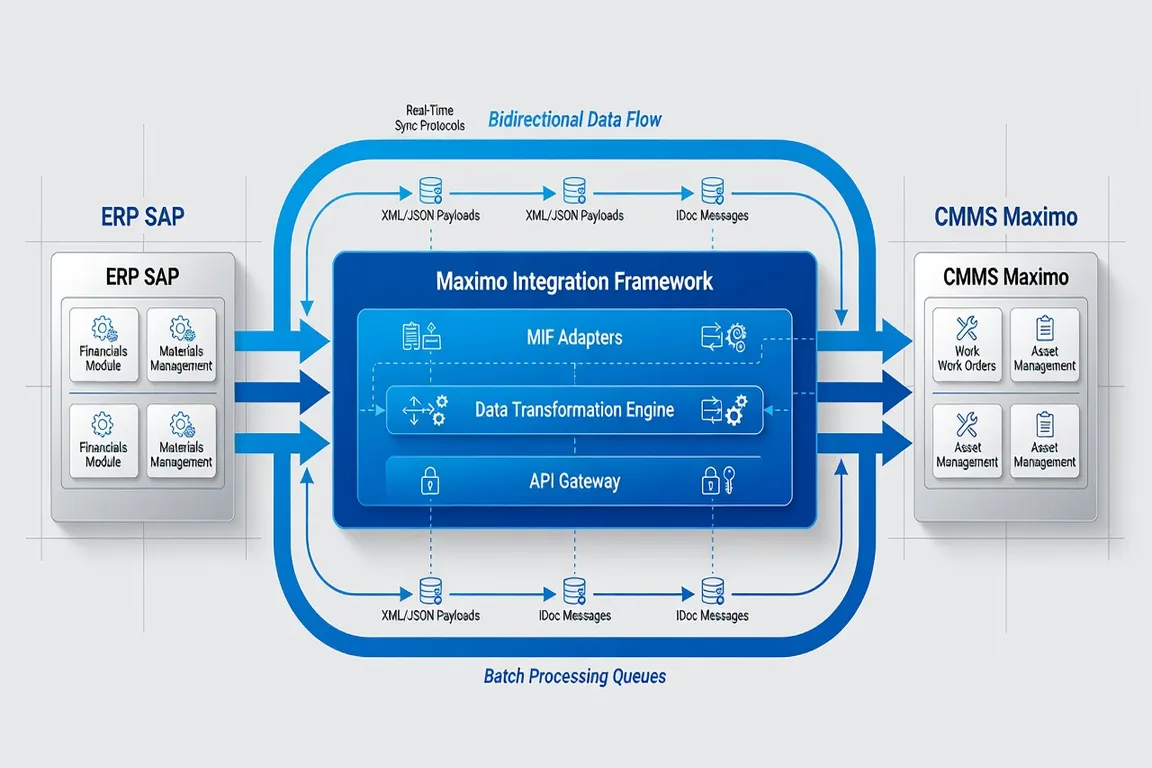
Maximo Integration Framework is the built-in integration layer for Maximo 7.6. It provides a configuration-driven approach to defining, transforming, and routing data between Maximo and external systems.
MIF is built around four core concepts:
-
Object Structures: Define which Maximo business objects and attributes are exposed in integration messages. An Object Structure for Work Orders might include WORKORDER, WOACTIVITY, WOLABOR, and WOSTATUS as related objects.
-
Publish Channels: Define the outbound messages that Maximo sends to external systems when records are created, updated, or deleted. A Work Order Publish Channel fires when a work order status changes, sending the updated work order data to a queue.
-
Enterprise Services: Define the inbound messages that Maximo accepts from external systems. An Enterprise Service for Asset Creation accepts asset data from an ERP system and creates or updates asset records in Maximo.
-
Endpoints: Define the delivery mechanism for integration messages — JMS queues, HTTP/S, SOAP web services, flat files, database tables, or email.
MIF also includes Processing Rules for conditional routing, XSL Transforms for data mapping, and External Systems as logical groupings of channels and services by integration partner.
Publish Channels Deep Dive
Publish Channels are triggered by events in Maximo — record creation, update, deletion, or status change. They serialize the affected record using its Object Structure definition and deliver the message to the configured endpoint.
Synchronous publish channels wait for an acknowledgment from the external system before returning to the user. Used when the external system must validate the data before Maximo confirms the transaction.
Asynchronous publish channels queue the message for delivery without waiting for confirmation. Used for high-volume scenarios where performance matters more than real-time confirmation.
The Integration message queue (JMSINTERNAL) is IBM MQ-based in most deployments. Failed message handling — dead letter queues, retry logic, error notification — is critical configuration for production MIF deployments.
For an understanding of the work order data that flows through these channels, see the Maximo Work Orders Guide.
Enterprise Services Deep Dive
Enterprise Services process inbound data from external systems. The service receives a message (XML, JSON, or flat file), maps it to a Maximo Object Structure, validates required fields, and creates or updates records using Maximo’s business object layer.
Enterprise Services support three processing modes:
- Full Replace: The inbound data completely replaces the existing Maximo record
- Merge: New attributes are added; existing attributes not in the message are preserved
- Delete: Records matching the inbound identifiers are deleted
Error handling in Enterprise Services is critical. Failed inbound messages should be captured in the Integration error log, with alerting to integration administrators. Silently dropped messages are one of the most common causes of data inconsistency in Maximo integrations.
Part 2: MAS REST API and OSLC
Architecture Shift in MAS
Maximo Application Suite introduces a modern API layer alongside (and gradually replacing) MIF for new integrations. The MAS API layer supports:
- REST APIs: Standard RESTful endpoints for all major Maximo business objects
- GraphQL: Flexible query language for complex data retrieval across related objects
- OSLC (Open Services for Lifecycle Collaboration): Industry-standard protocol for asset and lifecycle data exchange
- Webhooks: Event-driven outbound notifications without polling
For organizations on MAS, new integrations should be built using the REST API. Existing MIF integrations can often be maintained during migration but should be assessed for modernization.
REST API Basics
The MAS Manage REST API follows standard RESTful conventions:
Base URL: https://{mas-host}/maximo/oslc/os/{resourcetype}
Authentication: OAuth 2.0 / API Key header
Content-Type: application/json
Core endpoints for common operations:
| Operation | Endpoint | Method |
|---|---|---|
| Get Work Order | /maximo/oslc/os/mxwo/{wonum} | GET |
| Create Work Order | /maximo/oslc/os/mxwo | POST |
| Update Work Order | /maximo/oslc/os/mxwo/{wonum} | PATCH |
| Query Assets | /maximo/oslc/os/mxasset?oslc.where=assetnum=“{num}“ | GET |
| Create Service Request | /maximo/oslc/os/mxsr | POST |
The lean=1 query parameter strips OSLC metadata from responses, returning clean JSON — recommended for most integration scenarios.
GraphQL for Complex Queries
MAS GraphQL allows querying multiple related objects in a single request:
query {
  workOrdersByStatus(status: "WAPPR") {
    wonum
    description
    asset { assetnum, description, location }
    laborActuals { laborCode, regularhrs }
  }
}
GraphQL is particularly valuable for integration scenarios where the consumer needs data from multiple Maximo objects that would require multiple REST calls to assemble.
Security and Authentication
MAS API security uses OAuth 2.0 for human-user tokens and API Keys for system-to-system integrations. API Keys are generated in the MAS API Key management console and scoped to specific applications and operations.
For Maximo security configuration of API access, including application authorization for integration service accounts, see the Security Configuration guide.
Part 3: Common Integration Patterns
SAP Integration
SAP-Maximo integration is the most common enterprise integration scenario. Key data flows:
Equipment Master Sync (SAP PM → Maximo): SAP’s Equipment records are the source of truth for asset master data in organizations using SAP PM. A nightly batch or real-time sync publishes equipment data to Maximo via enterprise services, creating or updating Asset records.
Purchase Requisition/Order (Maximo → SAP): When Maximo creates a PR for non-stock materials, the PR is published to SAP via a publish channel. SAP creates a corresponding Purchase Order and publishes the PO number back to Maximo. This creates a linked procurement chain across both systems.
Financial Posting (Maximo → SAP FI/CO): When work orders are closed in Maximo with actuals, the labor and material costs are published to SAP for financial posting to the appropriate cost center or WBS element.

Oracle EBS / Oracle Cloud Integration
Oracle EBS integration follows similar patterns to SAP: asset synchronization from Oracle Fixed Assets or Plant Maintenance, PR/PO exchange with Oracle Procurement, and financial posting to Oracle GL.
Oracle Cloud integration increasingly uses Oracle Integration Cloud (OIC) as middleware, with MAS REST APIs on the Maximo side and Oracle Fusion REST APIs on the Oracle side.
IoT Platform Integration
For MAS Monitor deployments, IoT sensor data flows from devices through an IoT gateway to MAS IoT Platform connector. The connector maps sensor readings to Maximo measurement points on asset records, enabling condition monitoring and AI anomaly detection.
Modern API development practices for building these connectors are well-documented on platforms like CodeYourWeb, which covers integration patterns and REST API development in enterprise contexts.
GIS Integration
Maximo’s GIS integration (IBM Spatial) links asset records to GIS features, enabling map-based work order assignment and asset visualization. MAS includes enhanced GIS support with Esri ArcGIS integration out of the box.
Part 4: Integration Testing and Governance
Integration Testing Framework
Enterprise integrations require a structured testing approach:
Unit Testing: Test each Object Structure, Publish Channel, and Enterprise Service individually with known test data. Validate field mapping, data transformation, and error handling.
Integration Testing: Test end-to-end data flows with the external system in a test environment using representative data volumes. Verify that data created in System A appears correctly in System B within SLA timeframes.
Volume Testing: Test integrations with production-representative transaction volumes. Integration failures often appear only under load.
Failure Mode Testing: Deliberately introduce failures — network timeouts, invalid data, system downtime — to verify that error handling, retry logic, and alerting work as designed.
Integration Governance
Successful Maximo integrations require ongoing governance:
- Integration Registry: Document every integration — what systems, what data, what direction, what frequency. This registry is critical for impact analysis when Maximo is upgraded or external systems change.
- Error Monitoring: Real-time monitoring of integration queues and error logs. Set up alerts for queue depth exceeding thresholds or error rates exceeding defined limits.
- Change Management: Any change to an Object Structure affects all publish channels and enterprise services using that structure. Test thoroughly before promoting changes.
Getting Started with MIF Configuration
For organizations new to MIF configuration, the recommended starting sequence is:
- Define the integration scope: What data flows in what direction at what frequency?
- Build the Object Structure: Start with standard Maximo object structures where possible; customize only for data not in the standard structure.
- Configure the External System: Create the logical partner grouping in the External Systems application.
- Build and test the Publish Channel or Enterprise Service: Test with minimal data first, then expand to full records.
- Configure the Endpoint: Start with flat file or HTTP endpoints for initial testing, then implement JMS queue delivery for production.
- Implement error handling: Configure dead letter queues, error notifications, and retry policies before moving to production.
Choosing Between MIF and REST API
| Criteria | Use MIF | Use REST API |
|---|---|---|
| Maximo version | 7.6 | MAS |
| Message format | XML, flat file | JSON |
| Protocol | SOAP, JMS, file | REST, GraphQL, webhook |
| Transaction style | Batch, event-driven | Real-time, on-demand |
| Complexity | High (XML config) | Lower (standard REST) |
| Community resources | Mature | Growing rapidly |
For organizations on MAS building new integrations: always use REST API. MIF remains supported but represents the legacy path.
For organizations on Maximo 7.6 with existing MIF integrations: maintain MIF while planning the upgrade, and document your integration inventory for eventual REST API migration. For a broader platform comparison including integration capabilities, see the CMMS Best Practices guide.